Presentation Design

CareMed

Industry

Healthcare

Duration

2 weeks

Country

Egypt

CareMed Egypt presentation redesigned by Dots Presentations

The Challenge

What the client provided

CareMed is a third-party health insurance administrator with 1.45 million managed lives in Egypt and more than 30 years in the Middle East. But their presentation arrived as six plain white slides of dense bullet lists, with the strongest figures buried inside sentences. Nine customer services were split across three slides with numbering that restarted and repeated. Nothing on screen let a presenter jump to the part a prospect cared about. It read like a document, not a deck.

CareMed original slide: Why CareMed
CareMed original slide: Customer Convenience part 1
CareMed original slide: Customer Convenience part 2
CareMed original slide: Customer Convenience part 3
CareMed original slide: HR Convenience

Dots Solution

Made the deck navigable, not linear.

Right after the cover, a clickable table of contents organizes the deck into four chapters, each behind its own photo tile. A section tab bar runs across the top of every content slide, highlighting the current chapter and linking to the other three. The presenter can follow the room's questions, not the slide order.

Made the deck navigable, not linear.

Right after the cover, a clickable table of contents organizes the deck into four chapters, each behind its own photo tile. A section tab bar runs across the top of every content slide, highlighting the current chapter and linking to the other three. The presenter can follow the room's questions, not the slide order.

Put every detail one click away.

Nine services spread over three slides now sit on one 3x3 grid of icon tiles, each opening its own detail slide. In HR Convenience, clicking a tall image card expands it while the other three collapse to slim strips. Detail waits for a click instead of crowding the screen.

Put every detail one click away.

Nine services spread over three slides now sit on one 3x3 grid of icon tiles, each opening its own detail slide. In HR Convenience, clicking a tall image card expands it while the other three collapse to slim strips. Detail waits for a click instead of crowding the screen.

Turned buried figures into animated moments.

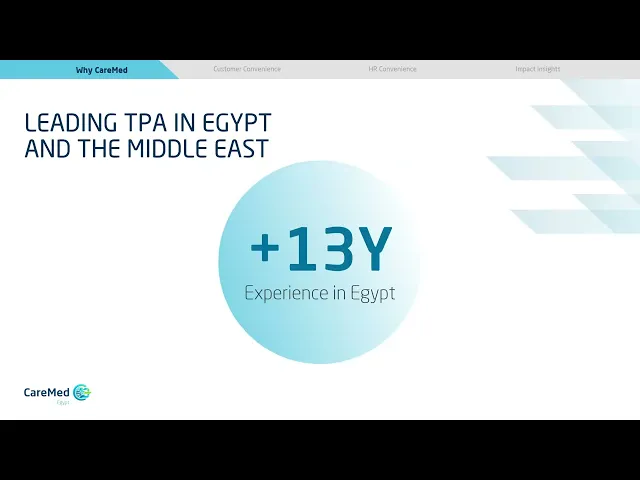
The 1.45M managed lives figure now builds in as the hero number, with circles breaking it into 1M and 450K. Experience animates in two beats: a +13Y circle grows for Egypt, then a larger +30Y circle for the Middle East. The long sentence listing twelve countries becomes a labeled map of the region, pinned country by country.

Turned buried figures into animated moments.

The 1.45M managed lives figure now builds in as the hero number, with circles breaking it into 1M and 450K. Experience animates in two beats: a +13Y circle grows for Egypt, then a larger +30Y circle for the Middle East. The long sentence listing twelve countries becomes a labeled map of the region, pinned country by country.

Drew the look from CareMed's own logo.

The original slides carried the logo in one corner and no other trace of the brand. We pulled CareMed's blues and teal from that logo, echoed its shape in a diagonal stripe motif that runs through the deck, and added consistent line icons. People photography and generous white space keep a health insurance deck feeling human, not clinical.

Drew the look from CareMed's own logo.

The original slides carried the logo in one corner and no other trace of the brand. We pulled CareMed's blues and teal from that logo, echoed its shape in a diagonal stripe motif that runs through the deck, and added consistent line icons. People photography and generous white space keep a health insurance deck feeling human, not clinical.

The Results

What we have designed

CareMed now has a fully clickable PowerPoint deck that looks as established as the company behind it. From the contents page, or the tab bar across every content slide, a presenter can reach any chapter in one click. Inside Customer Convenience, each of the nine services opens straight from the grid. Figures and tiles build in progressively, and the three Technology Platform bullets now play as a carousel with navigation dots, so the audience sees one point at a time. The content is the same. The experience of presenting it is not.
  • START YOUR PROJECT

  • START YOUR PROJECT

  • START YOUR PROJECT

  • START YOUR PROJECT

  • START YOUR PROJECT

  • START YOUR PROJECT